ComfortPure™ 3-in-1




Top questions about 3-in-1
How do I reset the red light filter indicator on my 3-in-1?
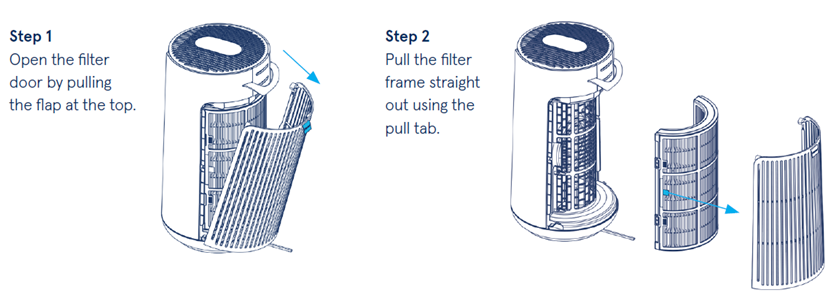
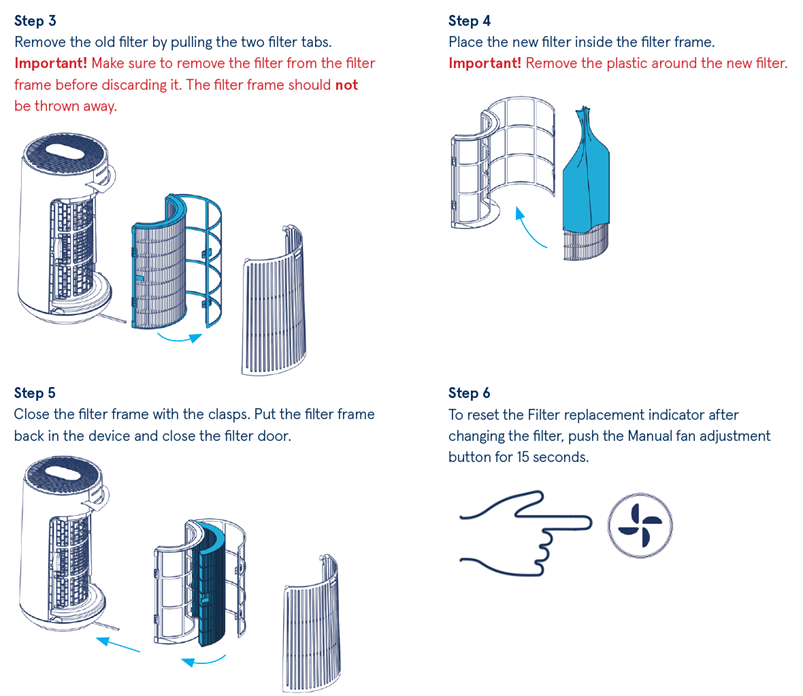
When the filter replacement indicator turns red on your device, it means the filter has expired and is ready to be replaced.
After replacing with a new filter, always reset the Filter replacement indicator by pressing the manual fan icon on the device for 15 seconds.

What is the difference between the AQI indicator and the mode indicator lights?
-
AQI Indicator Light
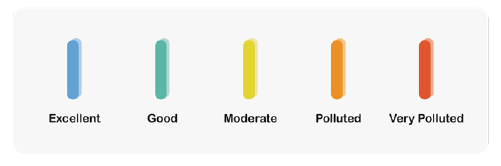
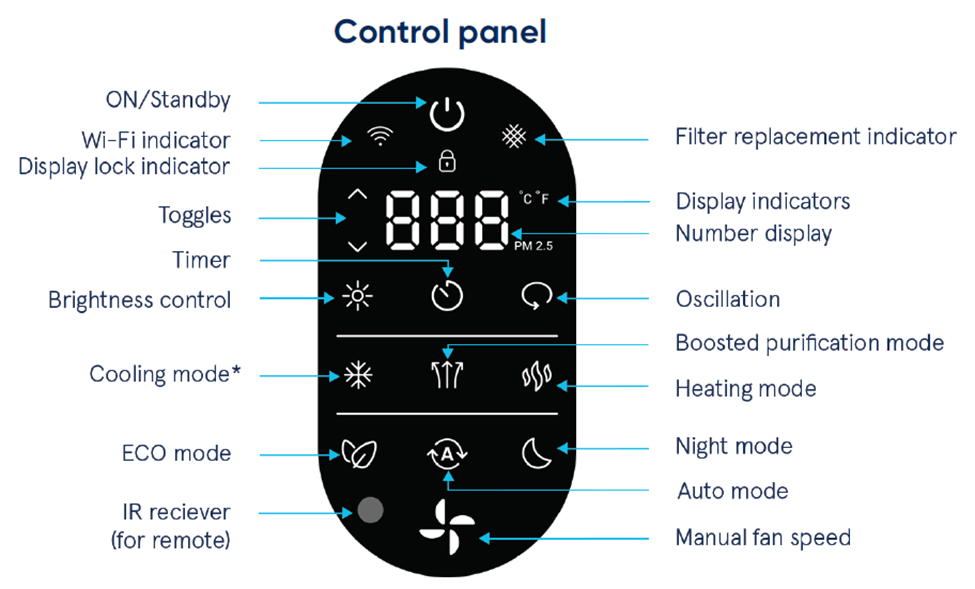
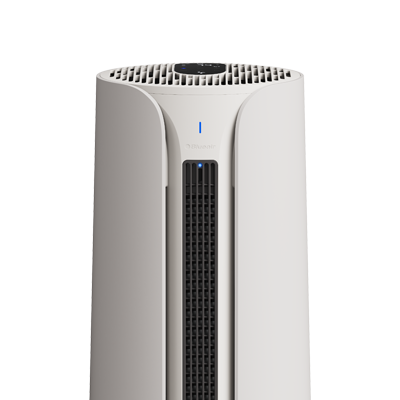
- The 3-in-1 air purifier has a particle sensor to measure the fine particle levels (PM 2.5) in the room. The AQI indicator displays the air quality status in five colors, from excellent (blue) to very polluted (red).
-
Mode Indicator Light
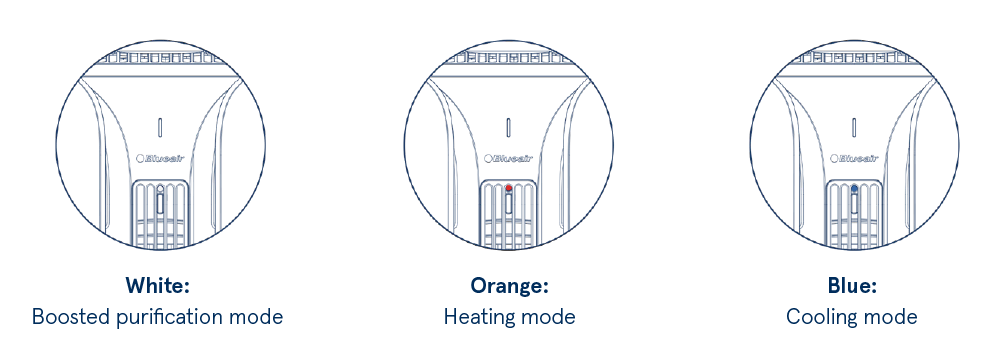
- The Mode indicator shows which main mode the device is currently in. The Mode indicator blinks when the remote is used to indicate that the device has received the command.
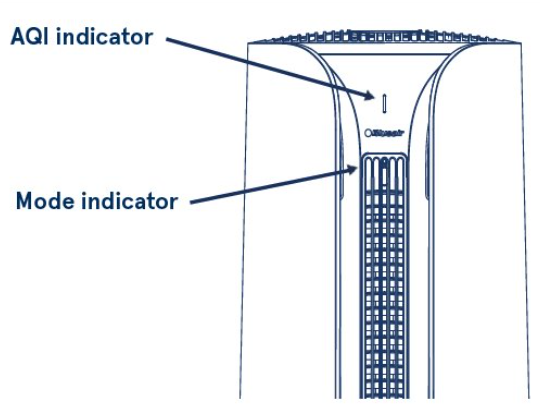
The AQI light will display a different color depending on the air quality of the surrounding environment.
The Mode indicator will display a different color depending on which mode function the device is currently doing.
How long can I run the device in heat mode?
-
The device has an overheating protection safety feature that will automatically turn off the heat mode if any of the below conditions are met
- The heat mode has run for more than 24 hours
- The device is not upright (has been laid on its side)
- The internal device temperature exceeds the expected range (overheating)
-
For the best user experience with heat mode follow the below suggestion
- Make sure the air inlets and outlets are completely clear of foreign objects and furniture that may prevent air from easily entering or exiting the device
- Always place the device on a flat floor surface, do not put the device on a table or at any angle other than upright
How often should I replace the filter?
-
The 3-in-1 air purifier calculates the remaining lifetime of the filter based on actual usage and indoor pollution levels. When it is time to change the filter, the filter replacement indicator will appear red on the control panel on top of the device. The recommended time for filter change is 6-9 months.
-
Use only original Blueair filters compatible with your device to ensure optimal performance.
What functions are compatible with Heating Mode?
-
Select Heating Mode to enjoy purified warm air. In Heating Mode, you can enable/disable these features:
-
These functions are available only through device controls on the device interface
- Manual fan speed adjustments
- Auto Mode (set a target temperature by pressing the Heating button on the device, wait for the toggles to flash and toggle up/down until you reach your desired target)
- Oscillation
- Timer
-
These functions are available through device controls as well a within the App
- Brightness adjustment
- Display Lock
-
These functions are available only through device controls on the device interface
- Eco mode and Night Mode are not available when Heating Mode is enabled.
- Due to regulatory requirements, Heating mode cannot be enabled via the app.
How to Use Videos
3-in-1 Troubleshooting
Why is the Heat Mode not functioning on my 3 in 1?
When heating mode is enabled, the heater will turn on/off depending on the target temperature that is displayed on the device interface.
- If the target temperature is set below the ambient temperature of the room, the heater will not turn on (for example the room ambient temperature is 74°F and the setpoint temperature on the device is 70°F).
- If the ambient temperature of the room is below the target temperature the heater will turn on until the temperature of the room reaches the target.
- Once the target temperature is achieved the heater will turn off until the ambient temperature drops below the target again.
To set a target temperature, press the heating button on the device interface, wait for the toggles to flash then press the toggles up/down until the desired target is displayed. After 3 seconds the target temperature will be set.
When heating mode is enabled, the device will always work toward the target temperature regardless of the sub mode (i.e. fan speeds 1-4 or auto mode).
When auto mode is enabled with heating mode, the device will increase fan speed to achieve the target temperature more quickly.
My 3-in-1 device cannot enter night mode
The air quality isn't improving with my 3-in-1. What should I do?
Potential Cause: After a long periods of operation, the sensor inlet may get dusty thus showing incorrect levels that do not improve.
Troubleshooting Steps:
- Unplug the air purifier and wait for approximately 30 seconds.
- Check for any objects or dust around the air quality sensors at the front of the air purifier. Gently wipe away the dust on the sensor with a soft cloth.
- Reconnect the power cable to the air purifier.
- Press the power button to restart the air purifier.
- If, despite using the air purifier and proper ventilation, the air quality still does not improve, please contact customer support for further assistance.
There is a smell when I turn on heat mode
- New products may emit an odor when first used, that is normal. When turning on Heat Mode for the first time there may be a faint smell. Run the device and ventilate the room to air out the air purifier and its filter to reduce the odor faster.
- All materials have their own smell, including filter materials. The filter is enclosed by a plastic bag and a cardboard box, and the smell from the product is accumulated inside. The smell from filter media is harmless.
- If the device has been stored for some time and not used, dust may collect on the heater causing a smell when initially turned on. This should dissipate within 15 minutes.
- When the filter is full and gets saturated with debris it can start to release a smell, and we recommend replacing it.
- The average expected lifetime of the filter is stated for each Blueair product. However, the expected filter lifetime can be highly dependent on the environment the air purifier is in which could require more frequent replacement.
Fan is on but I don't see any lights
- From the device panel, press the brightness control button and toggle the brightness with the toggles above.
- From within the app, simply select the 3 in 1 and control the brightness from the app interface.
Note: Each tap increases or decreases the brightness level.
User Manuals & Replacement Filters
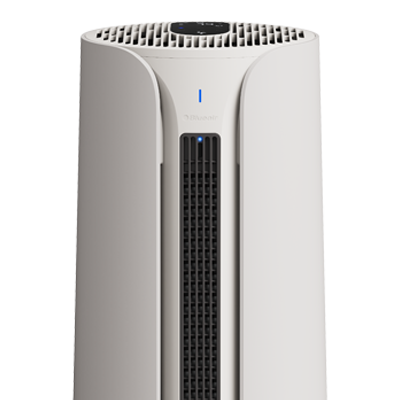
3-in-1 FAQs
Why is the Heat Mode not functioning on my 3 in 1?
When heating mode is enabled, the heater will turn on/off depending on the target temperature that is displayed on the device interface.
- If the target temperature is set below the ambient temperature of the room, the heater will not turn on (for example the room ambient temperature is 74°F and the setpoint temperature on the device is 70°F).
- If the ambient temperature of the room is below the target temperature the heater will turn on until the temperature of the room reaches the target.
- Once the target temperature is achieved the heater will turn off until the ambient temperature drops below the target again.
To set a target temperature, press the heating button on the device interface, wait for the toggles to flash then press the toggles up/down until the desired target is displayed. After 3 seconds the target temperature will be set.
When heating mode is enabled, the device will always work toward the target temperature regardless of the sub mode (i.e. fan speeds 1-4 or auto mode).
When auto mode is enabled with heating mode, the device will increase fan speed to achieve the target temperature more quickly.
How do I reset the red light filter indicator on my 3-in-1?
When the filter replacement indicator turns red on your device, it means the filter has expired and is ready to be replaced.
After replacing with a new filter, always reset the Filter replacement indicator by pressing the manual fan icon on the device for 15 seconds.
How do I put my 3-in-1 in Night Mode
-
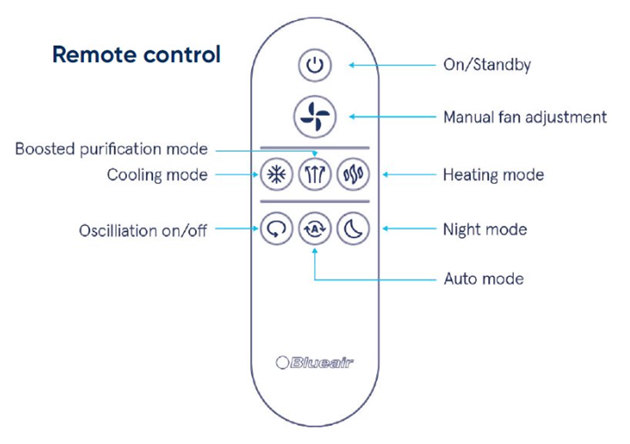
To turn on Night Mode, you can tap the Night mode icon on the device, the remote control or enable Night mode from within the Blueair app. Night Mode turns the device to a custom fan speed and dims the display to a low light level.
- Note: Heating mode is not available when the 3 in 1 is set to night mode.
How can I turn off the mode indicator light?
- In Cooling Mode or Air Purification Mode, the mode indicator light will turn off completely when Night mode is selected, or the brightness is turned to 0%.
- In Heating Mode, the mode indicator light is a safety and regulatory requirement and cannot be turned off regardless of the brightness setting.
- The Mode indicator shows which main mode the device is currently in. The Mode indicator blinks when the remote is used to indicate that the device has received the command.
What is the difference between the AQI indicator and the mode indicator lights?
-
AQI Indicator Light
- The 3-in-1 air purifier has a particle sensor to measure the fine particle levels (PM 2.5) in the room. The AQI indicator displays the air quality status in five colors, from excellent (blue) to very polluted (red).
-
Mode Indicator Light
- The Mode indicator shows which main mode the device is currently in. The Mode indicator blinks when the remote is used to indicate that the device has received the command.
The AQI light will display a different color depending on the air quality of the surrounding environment.
The Mode indicator will display a different color depending on which mode function the device is currently doing.